

Be seen. Be heard. Be found.
The "Verification Loop": A Guide to Fault-Finding Meta Business Suite Issues (2026 Edition)
Navigating the Meta ecosystem in 2026 can feel like trying to solve a Rubik’s cube that changes colors every time you make a move ...

For many Australian businesses and NFPs, the biggest roadblock isn't the content ... it's the dreaded "Verification Loop" and other issue you can have with Meta business suite. If you've uploaded your ABN, ASIC certificates, and utility bills only to be told "More Information Required," you aren't alone. Here is the modern blueprint for fault-finding your Meta Business Portfolio.
1. The Nomenclature Shift: Business Manager vs. Portfolio
First, let’s get the terminology right. In 2026, the old "Business Manager" has been fully absorbed into the Business Portfolio.
- Business Suite is your front-end (posting, replying, scheduling).
- Business Portfolio is your back-end (security, ownership, verification). Fault-Finding Tip: Most verification errors occur because people try to fix "Back-end" problems using "Front-end" tools. Always head to Settings > Business Settings to manage your Portfolio.
2. The "Letter-for-Letter" Audit
Meta’s 2026 integrity system uses AI-driven OCR (Optical Character Recognition) to cross-reference your documents with government databases like the ACNC or ASIC.
- The Mismatch Trap: If your ACNC record says "The Trustee for The Smith Family Foundation" but your Meta Portfolio just says "The Smith Family Foundation," the AI will auto-reject you.
- The Address Mirror: Your address in Business Info must be a carbon copy of the address on your utility bill or bank statement. "Lvl 4" vs "Level 4" can be enough to trigger a loop.
3. Verification "Triggers" (The Developer Backdoor)
Sometimes, the "Start Verification" button is greyed out or simply doesn't work. In 2026, you often need a reason to be verified.
- The App Loophole: If you are an NFP trying to run fundraisers, go to Meta for Developers and create a "Fundraiser App."
- The Result: Linking a specific app to your Portfolio forces the system to prioritise your verification request because there is a functional "need" for it.
4. The 48-Hour "Support Silence"
One of the most common mistakes is "velocity spamming." If you’ve messaged support five times in three days, the 2026 algorithm flags your account for "High-Velocity Risk." * The Fix: Stop all submissions and messages for a full 48 hours. This allows the automated fraud-detection window to reset, giving your next (clean) submission a better chance of reaching a human specialist.
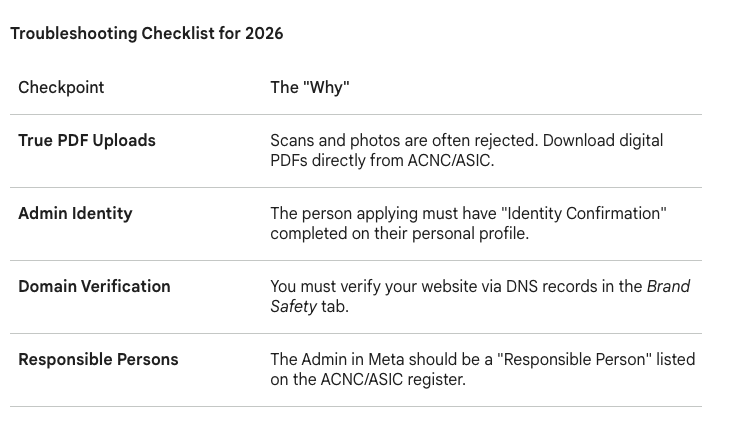
Summary: Stop Guessing, Start Matching
Fault-finding Meta isn't about trying more documents; it's about providing exact data. In the age of AI-driven compliance, the winner is the one who matches the government database the most precisely.
If you need a hand with Meta Business Suite in Australia - sing out! We're here to help.
SEARCH ARTICLE
SOCIAL MEDIA CHANNELS


Marketing Strategy
Let's Chat

Automation
Leverage AI. Get your apps talking to
each other.

Website Design
Be Found Online
RECENT POST: