

Be seen. Be heard. Be found.
WordPress Is Powerful. But Is It Right For Your Business?
The blog answers the question: "Should a small business owner without a dedicated developer actually use WordPress for their website?"
It powers 43% of the web and carries a loyal following.
But for small business owners without a dedicated developer, WordPress's hidden maintenance burden (and near-indefensible security surface) can quietly consume your time, budget, and peace of mind.
List of Services
-
11,334List Item 1
New WordPress vulnerabilities discovered in 2025 alone — a 42% jump on 2024
-
31/dayList Item 2
Average new vulnerabilities found every single day in 2025
-
96%List Item 3
Of vulnerabilities originate in third-party plugins, not WordPress core itself
-
43%List Item 4
Of new vulnerabilities are exploitable with zero authentication required
WordPress is free. Until it isn't.
When a new small business needs a website, WordPress is almost always the first suggestion on the table. It's open-source, there are thousands of themes, plugins exist for everything, and the initial cost is effectively zero.
But the sticker price is a fiction. What looks like a free website quickly reveals itself as an ongoing operational commitment that demands consistent technical attention; attention that most small business owners didn't sign up for and shouldn't have to give.
This isn't an argument that WordPress is bad software. For a development team or a dedicated digital operation, it can be an excellent choice. This is an argument that for the average Aussie small business owner who just wants a reliable, secure website (and wants to focus on actually running their business) WordPress may be the wrong tool, sold with the wrong expectations.
"Every hour spent troubleshooting WordPress is an hour not spent running or growing the business."
You cannot harden your way to safety.
The WordPress security narrative goes like this: install a security plugin, keep everything updated, use strong passwords, and you'll be fine. This advice isn't wrong, but it dramatically understates the scale of the problem.
According to the Patchstack State of WordPress Security in 2026 report, security researchers discovered 11,334 new vulnerabilities across the WordPress ecosystem in 2025. That is a 42% increase on 2024, which itself was a 34% increase on 2023. The trend is not levelling off — it is accelerating.
Key finding — Patchstack 2026
In 2025, 1,966 vulnerabilities received a high severity score — meaning they were likely to be exploited in automated mass-scale attacks. More high-severity vulnerabilities were discovered in 2025 than in the previous two years combined.
Crucially, the vast majority of these vulnerabilities (96%) don't come from WordPress core. They come from the plugins and themes that make WordPress useful in the first place. The contact form plugin, the SEO tool, the popup builder, the booking system, the slider: every plugin you install is a potential entry point, maintained by a third-party developer whose security practices you have no visibility over.
In 2024, 1,614 plugins were removed from the WordPress.org repository due to security concerns. Many sites running those plugins never received an automated warning. They remained vulnerable — and many still are.
Perhaps the most troubling finding from recent research: in 2024, more than half of plugin developers who were privately notified of a vulnerability did not patch the issue before it was publicly disclosed. That means attackers often learn about the flaw at the same time — or before — a fix is available.
And attackers are not sitting idle. Patchstack's data shows that exploitation often begins within hours of a public disclosure. For a small business owner checking in on their website once a week, that window is effectively invisible.
The hours add up to a real cost.
A WordPress site is not a set-and-forget system. It is a dynamic stack of interdependent components — core software, a theme, and anywhere from five to fifty plugins — each maintained by different developers on different schedules. When one updates, it can break another. When none update, the security exposure grows.
Industry estimates suggest the average business owner spends three to five hours per month on basic WordPress maintenance: updates, backups, checking that nothing has broken after an update, and investigating the occasional error. If your time is worth anything — and it is — that is a material hidden cost.
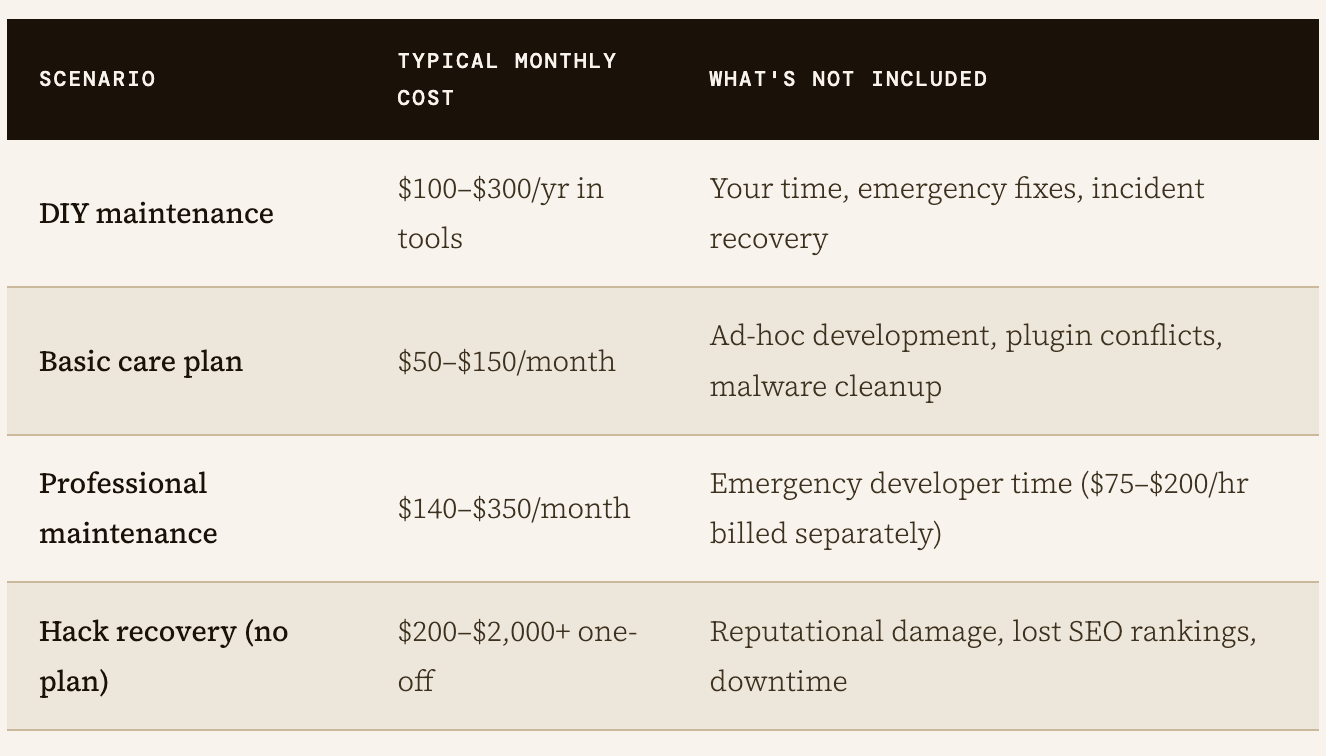
These costs compound quickly. Hosting, domain renewal, premium plugin licences, a security scanner, an SEO tool, a form builder — individually modest, collectively significant. A realistic annual budget for a professionally maintained small business WordPress site sits comfortably above $2,000 before any custom development is touched.
What does your business actually need?
WordPress makes sense for specific use cases: complex, content-heavy websites with dedicated technical resources; organisations that need deep customisation; developers building client sites they can actively maintain. It is a professional tool for professional contexts.
For a small business that needs a clean, fast, credible website (one that just works) the case is much weaker. Modern alternatives have matured considerably. Managed website builders like DUDA, Squarespace, Webflow, or Framer handle security patching, infrastructure, and updates at the platform level. You trade some (minor) customisation headroom for something more valuable: the ability to focus on your business rather than your website stack.
- Security updates happen at the platform level — no plugin patching requiredHosting, SSL, backups, and CDN are typically bundled and managedNo plugin ecosystem means no third-party vulnerability surface to monitorPredictable, flat monthly pricing with no surprise incident costs
- No developer dependency for routine content changes
This is not to say these platforms are perfect or without trade-offs. Migration away from them later can be awkward, customisation has real limits, and e-commerce functionality varies. But for the majority of small business websites — a Australian service business, a professional practice, a local retailer — these trade-offs are far less costly than the alternative.
The bottom line
WordPress is excellent software in the right hands. But "free and flexible" is not the same as "suitable for a business with no technical team." The security surface is vast and growing. The maintenance overhead is real and non-trivial.
The risk of a damaging incident is not theoretical.
Before choosing WordPress, ask one honest question: does your business have the time, budget, and technical capacity to maintain it properly? If the answer is no — or even maybe — there are better options built for exactly your situation.
The best website for your business is not the most powerful one. It is the one you can keep secure, working, and out of your way.
SEARCH ARTICLE
SOCIAL MEDIA CHANNELS


Marketing Strategy
Let's Chat
Automation
Leverage AI. Get your apps talking to
each other.

Website Design
Be Found Online
RECENT POST: